
Importing leagues & Basketball GM files
What carries over, what stays behind, and why imported ratings are rescaled
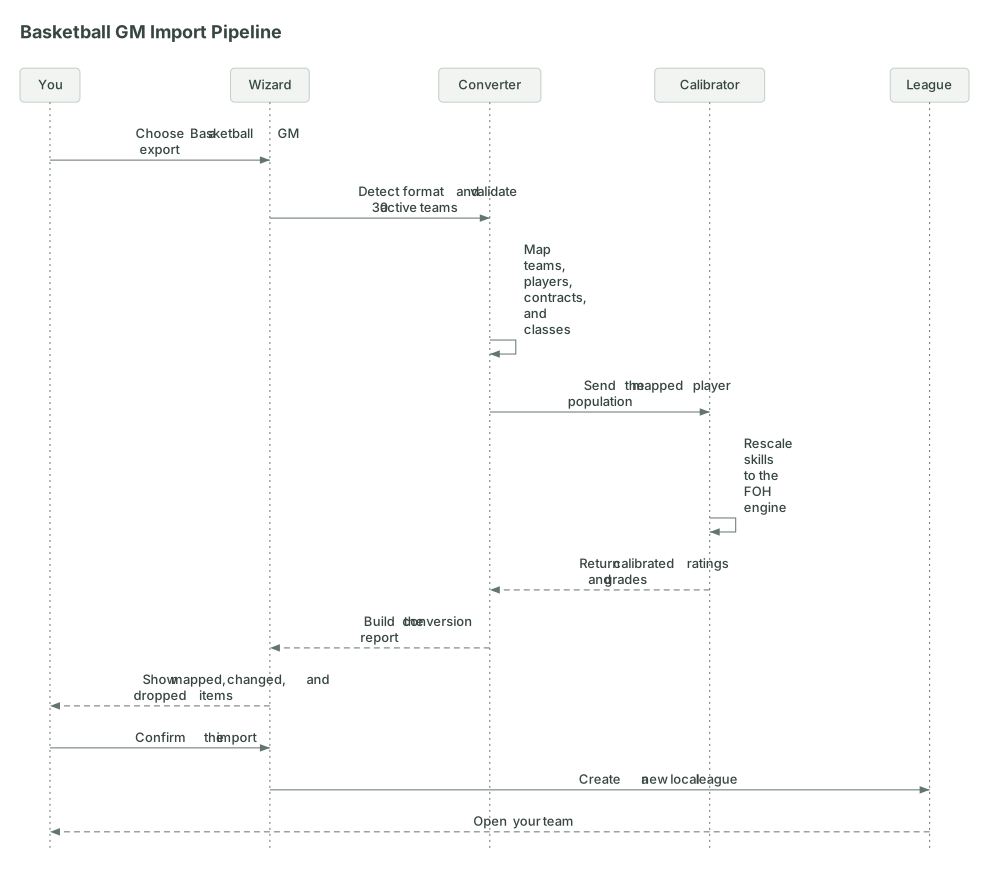
You don’t have to begin with a blank league. Choose Import a File in the setup wizard and hand it either a Basketball GM league export or a Front Office Hoops file, your own or one a community author put together. The wizard detects which kind you gave it and shows you a conversion report before anything is created. Nothing is tucked behind a silent “best effort”: you get a chance to read what mapped, what changed, and what was left behind before you take the job. An imported league also inherits the source file’s playoff format, play-in or classic, so the bracket you’re used to carries over.
This page covers three things: bringing in a Basketball GM league, bringing in a Front Office Hoops file, and building your own Front Office Hoops file to share.
Importing from Basketball GM
The importer has been tested with Basketball GM export versions 67 through 72. A newer version gets a warning instead of an automatic rejection, because its familiar fields may still map cleanly. An older version is rejected outright. The v1 league boundary is firmer: the file needs exactly 30 active teams. Older eras and expansion setups with a different team count aren’t padded or trimmed behind your back.
What comes across
The converter translates the pieces Front Office Hoops can use in a live league:
- Active team identities, including names, abbreviations, and colors. A supplied team logo can be used when available, with a monogram fallback when it cannot load.
- Current roster players and free agents, with names, positions, biographical details, physical measurements, and contracts translated into the Front Office Hoops shape. Salaries are scaled when the two leagues use different salary caps.
- Future prospects grouped into draft classes by draft year, up to three consecutive classes starting from the league’s first draft. Partial future classes are called out as partial rather than quietly filled in.
- The Basketball GM skill set, translated into the 11 Front Office Hoops skills. Overall and potential are then calculated by Front Office Hoops, and every player-facing rating appears as a letter grade.
- Whatever history and traded-pick ownership the conversion can actually carry. The report tells you the history depth it found and whether pick ownership was imported or reset; it never asks you to assume.
Basketball GM can carry more than 15 players on a team, while a Front Office Hoops active roster tops out at 15. The conversion report shows each team’s count after the cut and names anyone who could not stay on the active roster, they land in free agency instead of disappearing.
Why the ratings change scale
The two games do not attach the same basketball meaning to the same hidden number. Copying those values straight across can make a great perimeter scorer play like he cannot shoot, even when the ordering in the source file makes sense.
So we re-grade every imported player on our own curve so the sim plays fair. In plain words, the converter keeps the source file’s opinion about who is better at a skill, then moves the whole imported player pool onto the range this game expects. Front Office Hoops recalculates each player’s overall and potential after that pass. You see the result as letter grades, just like you do in a fresh league. Team grades get a league-specific anchor too, so an imported roster is judged against the league it arrived with instead of being forced onto a generated-roster baseline.
This recalibration is specific to Basketball GM imports, since it’s what makes a foreign rating scale mean the same thing here. A Front Office Hoops file you build by hand skips it entirely. Whatever numbers you put in ratings are the numbers the sim uses, so pick them the way you’d pick them for a real player: relative to the rest of your league, on the same 0-to-100 scale the game already uses.
What stays behind
Disabled historical franchises do not become active teams. Retired players do not return as active roster bodies. Scheduled future events, external player-photo links, and source-specific IDs have no live-league equivalent and are dropped. A mid-season export is accepted, but its completed games and remaining schedule are not: the imported roster starts a fresh season, and the report says so.
Some Basketball GM exports carry decades of awards, ratings, playoff series, and transactions. Do not judge the result by the file’s size. Read the History depth and Dropped lines in the conversion report; those are the record of what this particular import retained. All player stats shown in Front Office Hoops are per-game averages, not season totals.
Importing a Front Office Hoops file
A Front Office Hoops file is the straight path: nothing gets converted, so there’s no ratings translation to second-guess and no report full of dropped fields. Export from Settings whenever you want a backup or need to move a league to another browser or device, then choose Import a File in the setup wizard. For the full story on local storage and backups, see Your saves & your data.
This same file format is also the one you’d hand a friend, or post for other players to load, which brings us to the next section.
Building a Front Office Hoops file
You don’t need to be a programmer to put a custom roster together, but you do need to follow the shape the game expects. This section describes that shape well enough to build one, or to edit one you already have.
The easy way: export and edit
The fastest path to a working file isn’t writing one from scratch. Build a league in the game the normal way, then use Settings → Export to get a real, valid file. Open that in a text editor and change what you want: team names and colors, a player’s stats, a whole roster. Because you’re starting from something the game already accepts, you only have to get your edits right, not the entire structure.
The other easy way: let an AI agent write it
This page is written so an AI assistant (Claude, ChatGPT, or whatever you use) can build a valid file from it. Point your agent at this page, describe the league you want, and have it generate the file. A prompt like this works well:
Read the Front Office Hoops importing guide at frontofficehoops.com/wiki/importing-leagues, then generate a complete FOH league file as a single JSON document. Follow every limit on that page: exactly 30 teams, 10 to 25 players per roster (aim for 15), exactly 3 coaches per team, exactly one team with is_user_team set to true, and consecutive draft-class years. Ratings are 0 to 100 on FOH’s own scale, where 85+ is a star and the mid-70s is a typical starter. The league I want: [describe your teams, era, and stars here].
Two habits make agent-built files land on the first try: have the agent start from an exported file when you can (paste one team’s JSON as a shape reference), and expect a validation error or two on the first import. The error messages name exactly what’s wrong, so feeding them back to the agent usually fixes the file in one round.
The shape of the file
At the top level, a league file has four required pieces and two optional ones:
| Key | Required | Holds |
|---|---|---|
meta |
yes | league name, starting season, settings |
conferences |
yes | grouping for divisions |
divisions |
yes | grouping for teams |
teams |
yes | 30 teams, each with a roster and coaching staff |
free_agents |
no | unsigned player pool |
draft_classes |
no | future prospects, grouped by year |
meta carries the league’s identity and rules:
{
  "meta": {
    "schema_version": "1.0",
    "league_name": "Retro '96 League",
    "season_start": 2026,
    "settings": {
      "salary_cap": 140000000,
      "luxury_tax": 170000000,
      "roster_size_max": 15,
      "roster_size_min": 13,
      "season_length": 82,
      "playoff_teams": 16,
      "playoff_format": "play_in"
    }
  }
}
playoff_format is optional and defaults to classic (no play-in game) when left out.
conferences and divisions are simple id/name pairs that teams reference:
{
  "conferences": [
    { "id": "east", "name": "Eastern Conference", "divisions": ["atlantic"] }
  ],
  "divisions": [
    { "id": "atlantic", "name": "Atlantic", "conference": "east" }
  ]
}
A team needs an identity, a division reference, a roster, and a coaching staff:
{
  "id": "team-bos",
  "city": "Boston",
  "name": "Lumberjacks",
  "abbr": "BOS",
  "division": "atlantic",
  "primary_color": "#007A33",
  "secondary_color": "#FFFFFF",
  "arena": "Freedom Trail Center",
  "market_size": "large",
  "is_user_team": true,
  "roster": [],
  "coaches": []
}
roster holds 10 to 25 player objects (see the player shape below). coaches holds exactly 3 coach objects, in order: head coach, then two assistants. A normal Front Office Hoops team runs 15 active players, and that’s still the number to aim for. The importer’s own ceiling is looser, up to 25, mainly so it doesn’t fight you over a roster you’re still assembling, but going well past 15 puts you outside what the game normally expects a team to carry.
Exactly one team across the whole league needs is_user_team: true, that’s the team you’ll run. market_size is small, medium, or large. Leave out franchise_state and the game figures out each team’s story (rebuilding, title contender, and so on) from the roster you gave it, so you don’t have to hand-classify 30 teams.
A player is the most detailed piece. Here’s a minimal but complete one:
{
  "first_name": "Marcus",
  "last_name": "Webb",
  "age": 24,
  "position": "SG",
  "secondary_position": null,
  "jersey_num": 23,
  "college": "Duke",
  "country": "USA",
  "archetype": "balanced",
  "secondary_archetype": null,
  "ratings": {
    "ovr": 78, "pot": 82,
    "ins": 55, "mid": 70, "thr": 75, "pas": 60, "iq": 65,
    "def": 60, "reb": 45, "spd": 68, "str": 55, "jmp": 70,
    "endu": 72, "injury_prone": 20
  },
  "physical": { "height_in": 76, "weight_lbs": 205, "wingspan": 79 },
  "contract": {
    "salary": 8500000,
    "years_remaining": 3,
    "type": "standard",
    "no_trade": false
  }
}
A few things worth knowing about that shape:
-
Every rating in
ratingsis a number from 0 to 100, and it’s used exactly as written, there’s no recalibration pass for a hand-built file (that only happens on a Basketball GM import, see above). Look at a couple of players from an exported league to get a feel for where a rotation player sits versus a star before you start typing in your own numbers. -
positionandsecondary_positionare one ofPG,SG,SF,PF,C. Setsecondary_positiontonullif the player doesn’t have one. -
contract.typeis one ofstandard,max,supermax,mid_level,vet_min, orrookie_scale. -
archetypedescribes a player’s personality for free agency and re-signing. It has to be one of these nine exactly, andsecondary_archetypetakes the same values ornull:Value What he wants ring_chaserWill take less to join a contender money_firstFollows the largest offer loyalGives his current team a real discount big_marketDrawn to the big markets hometownDrawn back to where he is from star_seekingWants to play alongside a star featured_roleWants the ball and the minutes mentor_seekerYoung player looking for a veteran to learn from balancedNo strong preference Spelling counts. The game matches these exactly, so a made-up value like
shot_creatoris not rejected, it just never matches anything and the player ends up behaving likebalanced. If you don’t want to hand-pick a personality for every player, writebalancedand move on. -
faceis optional. Leave it out and the game assigns a face from its pool automatically, matched to the player’s country. -
tendenciesis optional and controls shot selection and playstyle. Leave it out and the game rolls a sensible profile from the player’s ratings. Any field you leave out is rolled from ratings, so you can set just the ones you care about. The fields, with the scale each one expects:Field Scale What it controls usage0 to 100 How often he hunts his own shot usageShare5 to 45 His share of the team’s possessions, as a percent (a star runs 30 or more) mixInside/mixMid/mixThree0 to 100 each Shot mix by location, weighted against each other eff2p0 to 1 Two-point percentage, as a fraction (a good big sits around 0.60) eff3p0 to 1 Three-point percentage, as a fraction (a good shooter sits around 0.40) rebRate0 to 20 Total rebounds per 36 minutes (an elite rebounder runs 12 to 15) tovRate3 to 30 Turnovers per 100 possessions he uses (most players sit 8 to 16) handling/ftSkill/stealing/blocking0 to 100 each Set the player’s HND, FT, STL, and BLK ratings Watch the scales.
eff2pandeff3pare fractions like0.52, not percentages, andrebRateis a per-36 number like11.5, not a rating. A value outside the range is rejected rather than clipped. -
Free agents use the same player shape as roster players, just without a
contractblock. Draft prospects use the same shape too, without acontractand without a team.
Coaches are required, three per team in this order: head coach, then two assistants. Each one needs its own name, age, role, ratings, and contract, along the same lines as a player. If you’re editing an exported file rather than writing one from nothing, the easiest move is to leave the coaching staff as-is and focus your edits on the roster.
A draft class, if you include one, groups prospects by year:
{
  "draft_classes": [
    { "year": 2026, "prospects": [] }
  ]
}
prospects holds up to 200 prospect objects, each one using the same shape as a player but without a contract and without a team. Draft class years must run consecutively starting from meta.season_start, you can’t skip a year.
Limits and rejections
These are hard ceilings. A file that goes over one gets rejected with an error telling you exactly what’s wrong, it is never silently trimmed to fit:
- File size: 25 MiB.
- Players on a team’s roster: 25. Go over that and the whole file is rejected, it doesn’t get cut down to size for you.
- Free agent pool: 500 players.
- Draft classes: 10.
- Prospects per draft class: 200.
- Player and league names: 100 characters (120 for the league name itself).
- Embedded player images: 1 MiB per image if you’re using data URLs rather than links.
A roster also needs at least 10 players and exactly 3 coaches, and the league needs exactly 30 teams with exactly one marked as yours. Those floors exist so a team can take the field at all.
League imports and draft-class imports are different jobs
Importing a league happens in the setup wizard and creates a new save. Importing a draft class is for a league you are already running: it replaces an upcoming generated class with prospects from a file, without replacing your teams, standings, or the rest of the save. That is the route for bringing a later community class into a career that is already underway.
The two jobs also take different file shapes, which is the one thing most likely to trip you up. Inside a full league file, classes live in a draft_classes array as shown above. A standalone class file is its own document with a schema_version and a single draft_class:
{
  "schema_version": "1.0",
  "draft_class": {
    "year": 2027,
    "prospects": []
  }
}
Load it from the Draft page in your league: Import draft class, then Choose JSON file.
Building a standalone class
Start from the sample class file. It has two complete prospects, so the fastest route is to change the year, then copy a prospect block once per player you want.
Every prospect needs a first and last name, an age from 16 to 99, a position (PG, SG, SF, PF or C), a jersey_num from 0 to 99, a country, an archetype, a full ratings block, and a physical block with height_in, weight_lbs and wingspan.
Four fields catch people out, because they are required but often have no value: secondary_position, college, and secondary_archetype must each be present, written as null when they don’t apply. Leaving the field out entirely is an error, while null is fine.
The ratings block needs all fourteen keys, each from 0 to 100: ovr, pot, ins, mid, thr, pas, iq, def, reb, spd, str, jmp, endu and injury_prone. As with league files, face and tendencies are optional and get filled in for you.
A prospect has no team and no contract, so a contract block, or any of team, team_id, teamId or tid, will be rejected. The draft decides where he lands.
Two ways a correct file still gets turned away
The year has to match. draft_class.year must be the year of the draft your league is heading into, so a 2027 class won’t load into a league still playing 2026.
Bring it in before the class is generated. Once the game has created that season’s prospects, it won’t overwrite them, so import ahead of draft night rather than during it.
Troubleshooting
“File format not recognized.” The wizard didn’t see the shape of either a Basketball GM export or a Front Office Hoops file. Make sure you’re pointing it at a full league export, not a save fragment.
“This file has players but no teams.” Some Basketball GM exports are player-only files, a hand-built roster or a standalone draft class. Front Office Hoops needs a full league export or a season roster file that includes teams.
“This file has [N] teams. FOH requires exactly 30.” Variable league sizes aren’t supported yet, whether the file is short a few teams or has extras from an expansion save.
“Team roster must contain no more than 25 players.” Trim the team’s roster array yourself before importing. The game won’t do it for you.
“Team must have at least 10 players” / “must have exactly 3 coaches.” Every team needs enough bodies to take the floor and a full three-person coaching staff, no exceptions.
The useful rule is simple: pause on the conversion report. It is there to make the boundary honest before you commit, especially when the source file carries more history or roster machinery than Front Office Hoops does.
Stuck on a file that won’t import? Post in r/FrontOfficeHoops and we’ll help you get it working. Attach the error message you’re seeing, and the file itself if you’re comfortable sharing it.